
Who this helps
For a planner changing column widths and leaving room for sketches. Headings, dates, tasks and boxes are handwritten.
Count intervals
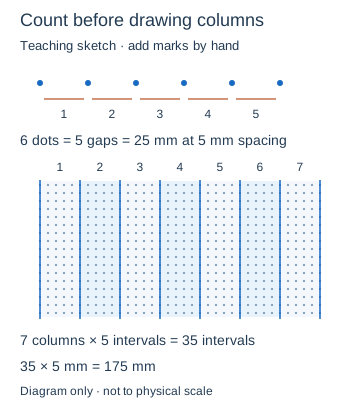
Two dots mark one interval. At 5 mm spacing, six intervals span 30 mm. Seven columns of five intervals use 175 mm, fitting within this A4 drawing width of 186 mm. Leave the remaining width as breathing room.
Balance visibility
Dot diameter 0.6 mm is a starting choice, not a verified printer result. Pale #8aaccb can recede behind pen marks. Try a darker color or larger diameter if dots disappear. Diameter is separate from spacing and cannot exceed it.
Lay out seven columns by hand
In the teaching diagram, each column spans five dot intervals. Its six boundary dots form five gaps, so the seven columns use 35 intervals, or 175 mm at the linked 5 mm setting. Start each next column on the previous boundary. The colored divisions are drawing instructions, not a calendar generated by the tool.
Reproducible settings
- Paper size
- A4
- Orientation
- Vertical
- Display units
- Millimeters
- All margins
- 12 mm
- Pattern color
- #8aaccb
- Dot spacing
- 5 mm
- Dot diameter
- 0.6 mm
Create it step by step
- Open the configuration. Confirm A4, Vertical, Millimeters and All margins 12.
- Set Dot spacing 5 and Dot diameter 0.6. Open Line appearance for Pattern color #8aaccb. There is no Line width setting for dots.
- Choose Download SVG or Print / Save as PDF for a 100% test. Inspect the dot-only output.
- On paper, reserve four intervals for a heading. Pencil seven columns five intervals wide. Add dates and a separate task area by hand.
Generated sample

Teaching sketch: marks you add by hand
Print or export
One blank dot page. PAPRIVELA does not automatically generate calendars, habit trackers or task lists; you build them on the printed dots.
Match paper size and orientation. Print at 100% / Actual Size and check one test sheet before making copies.
Common questions
My columns are too wide. What should I count?
Count gaps between dot centers. Six dots contain five intervals, or 25 mm here.
Do larger dots give more writing room?
No. Increase Dot spacing for more room; Dot diameter changes mark size.