
Task
Make an undated planning sheet adaptable from week to week, leaving open space for notes.
What You Will Make
One A4 portrait page with 5 mm dot intervals and 0.6 mm dots. No calendar, dates, task checklist or tracker boxes are automatically generated.
Settings
- Paper size
- A4
- Orientation
- Vertical
- Display units
- Millimeters
- All margins
- 12 mm
- Pattern color
- #8aaccb
- Dot spacing
- 5 mm
- Dot diameter
- 0.6 mm
Create It
- Open the configuration and confirm A4 portrait, Millimeters and All margins 12.
- Set Dot spacing 5 and Dot diameter 0.6; check Pattern color #8aaccb in Line appearance.
- Print a 100% test via Print / Save as PDF or keep the vector sheet with Download SVG.
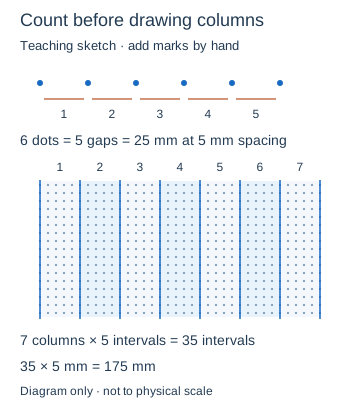
- Pencil four intervals for a heading, then seven columns of five intervals each. Add dates and a task key by hand after checking the column count.
Preview

Teaching sketch: marks you add by hand
Print or Export
SVG and browser PDF retain only blank dots. Export Settings saves the pattern configuration, without the planning notes you add by hand.
Match paper size and orientation. Print at 100% / Actual Size and check one test sheet before making copies.
How to Use the Printed Page
Use the teaching diagram to count 35 dot intervals across seven 25 mm columns, leaving the rest of the 186 mm drawing width clear. Place the heading four intervals (20 mm) below your chosen start. Add your own dates and key for open, completed and moved tasks; the downloaded page contains only dots.
Check the Result
Count five gaps, not five dots, for a 25 mm column. Test pen readability. If dots disappear, increase diameter or darken Pattern color and retest.