
Who this helps
For a shelf concept or small block arrangement. This hand-drawing aid is not a dimensioned engineering drawing.
Three line families
The renderer draws vertical lines and diagonals at +30° and −30° to the horizontal. As undirected families, their directions are separated by 60°. Use a vertical edge and both diagonal directions to suggest three axes.
Perpendicular spacing
The setting is the shortest distance between parallel lines in each family. A value of 6 mm is neither a hexagon side length nor a segment length along a diagonal. Count matching repeated intersection steps for corresponding edges.
Construct the block in stages
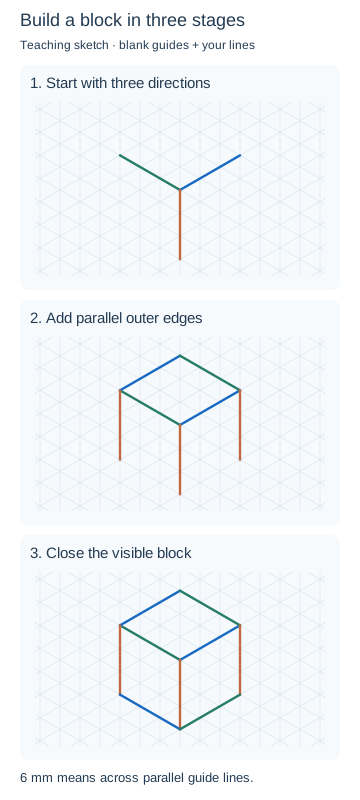
The teaching diagram starts with three edges from one corner, adds parallel edges and closes the last corner. The colored edges illustrate marks you draw by hand over blank guides. Follow directions and equal step counts; the tool itself still exports only the guide grid.
Reproducible settings
- Paper size
- A4
- Orientation
- Horizontal
- Display units
- Millimeters
- All margins
- 12 mm
- Pattern color
- #8aaccb
- Perpendicular line spacing
- 6 mm
- Line width
- 0.15 mm
Create it step by step
- Open the landscape configuration. Confirm A4, Horizontal, Millimeters and All margins 12. Set Perpendicular line spacing 6.
- Open Line appearance for Line width 0.15 and Pattern color #8aaccb. Inspect all three directions.
- Choose Print / Save as PDF at 100%. Pick an interior intersection, draw a vertical edge and extend edges along both diagonal families.
- Join parallel edges to close the block. Count equal repeated steps for matching lengths and add intended dimensions by hand.
Generated sample

Teaching sketch: marks you add by hand
Print or export
Download SVG keeps one blank landscape guide page. The tool does not generate a 3D model, shaded object or automatically measured sketch.
Match paper size and orientation. Print at 100% / Actual Size and check one test sheet before making copies.
Common questions
Is a cube edge 6 mm long?
Not necessarily. The input is across parallel lines, not along an edge. Label intended dimensions separately.
My block does not close. Should I change the grid?
Check directions and step counts first. A missed intersection can leave a gap.